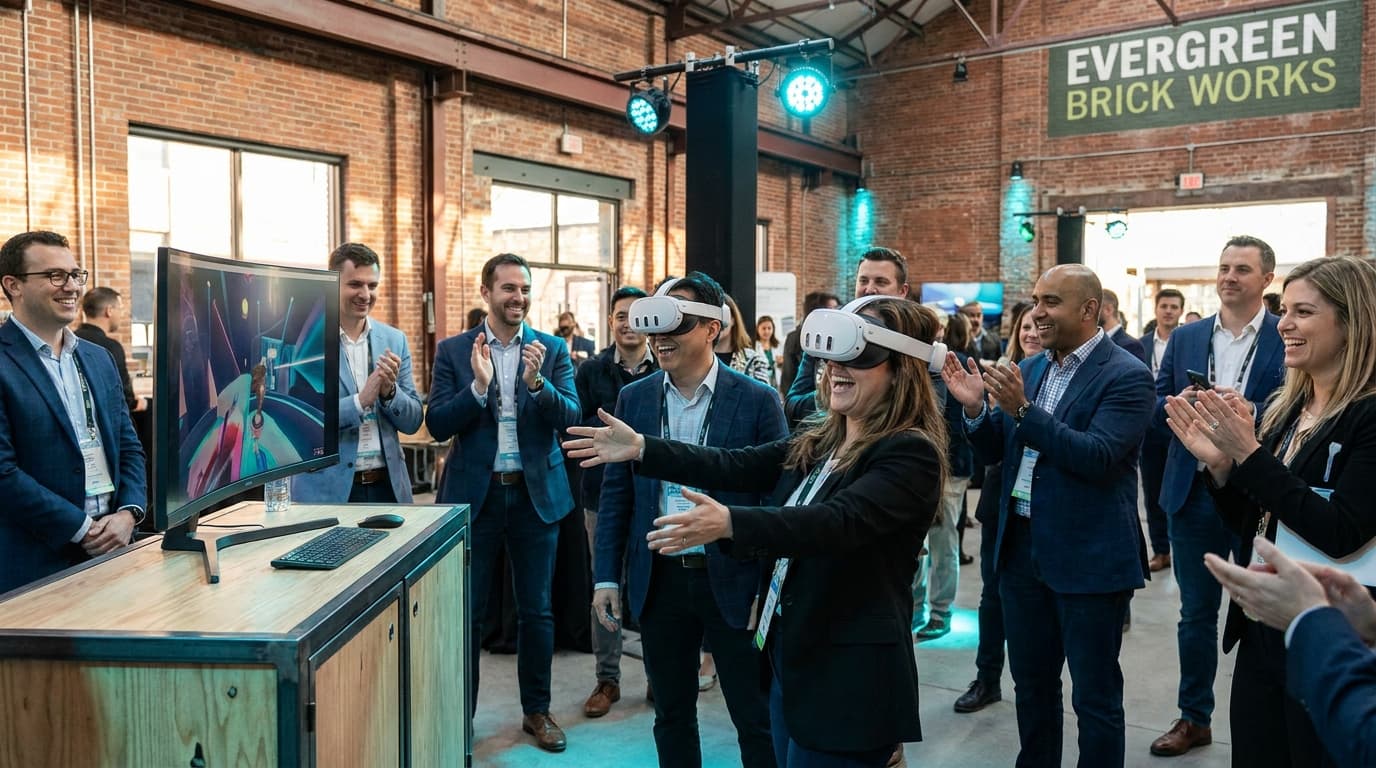
An event entertainment planning checklist is a strategic operational document that covers spatial footprint, power requirements, throughput pacing, and hygiene protocols to ensure interactive activations run without bottlenecks. If you skip these logistical steps, your entertainment becomes a liability instead of an asset.
I have scrubbed makeup off 40 medical-grade silicone headset covers at midnight in the loading dock of the Fairmont Royal York. I have navigated the service elevators of Bay Street high-rises with carts full of enterprise networking gear just to bypass a corporate firewall. I have watched a stoic CEO scream with laughter while swinging virtual lightsabers, drawing a crowd of 100 employees who finally saw their boss act like a normal human being.
After executing over 200 corporate activations across the GTA, I can tell you exactly why most interactive entertainment fails: operators treat the activation like a casual game night instead of a military-grade logistical operation. If you are reading any generic corporate event planning guide, it will tell you to "book fun activities" and stop there. That is terrible advice.
When you bring high-end tech into a demanding venue like the Enercare Centre or a Financial District boardroom, hope is not a strategy. You need a bulletproof framework. This guide is the exact operational blueprint we use to guarantee zero downtime, maximum throughput, and absolute hygiene. To master your logistics, we have built out this complete event entertainment planning checklist to cover everything from hidden union venue fees and vendor interrogation tactics to asymmetric game curation and pre-event attendee communication.
The Non-Negotiable Event Entertainment Planning Checklist
Interactive entertainment requires rigorous spatial, electrical, and network planning. You cannot simply point to a corner of a ballroom and expect magic to happen. The following checklist details the exact pre-event reconnaissance required to ensure flawless execution.
Spatial Footprint and Traffic Flow
Physical space dictates everything. Moving people safely through an interactive area requires exact measurements.
- Allocate exactly 6.5 x 6.5 feet (2m x 2m) of unobstructed space per standing station.
- Allocate 3 x 3 feet for seated or stationary experiences.
- Establish a dedicated buffer zone of 3 feet between the physical gameplay boundary and the spectator viewing area to prevent accidental collisions.
- Position the activation near high-traffic areas, such as the bar or food stations, but never blocking main fire exits or catering routes.
- Confirm ceiling heights. Players will reach upward; a standard 8-foot drop ceiling in an older office building requires careful game curation to prevent damage to acoustic tiles.
Power and Connectivity Reconnaissance
You would be shocked how many venues claim to have "plenty of outlets" only to provide a single 15-amp circuit shared with the DJ and a coffee percolator. A blown breaker kills the party instantly.
- Verify dedicated power drops. Hardware requires a dedicated 15-amp or 20-amp circuit independent of catering equipment or heavy AV lighting.
- Audit the WiFi infrastructure. Multiplayer experiences require internet access. Standard venue WiFi often utilizes captive portals (splash pages requiring email entry) which block headless devices like Meta Quests.
- Secure authorization to bypass the venue firewall, or confirm your vendor brings proprietary enterprise networking gear to create an isolated local network.
- Identify specific cable routing paths from the wall outlet to the station. Every inch of cable must be secured with high-visibility gaffer tape to eliminate trip hazards.
Hardware Reliability and Contingencies
Equipment fails. Batteries die. Controllers drift. Your event logistics checklist must account for hardware redundancy.
- Mandate extended battery straps for all wireless devices. Standard internal batteries die in two hours; extended straps guarantee uninterrupted all-day operation.
- Verify a 20% hardware redundancy ratio. If you book five stations, your vendor must bring a sixth fully configured backup unit ready to hot-swap within 90 seconds.
- Confirm the vendor utilizes continuous power solutions for spectator casting TVs, ensuring the video feed never drops during peak engagement hours.
Navigating Hidden Venue Fees and Union Traps
Toronto's premier event spaces operate under strict guidelines. If your vendor is inexperienced, you will end up absorbing catastrophic hidden costs on the day of the event.
For instance, at venues like the Metro Toronto Convention Centre (MTCC) or the Enercare Centre, you cannot simply plug an extension cord into a wall socket. Electrical distribution is strictly managed by exclusive in-house providers like Showtech. They will charge you for every single 15-amp drop. A naive vendor will assume power is free, blow a circuit during setup, and leave you with a $300 emergency union electrician bill just to reset the breaker.
Furthermore, consider drayage and loading dock rules. Large interactive setups require cases of gear. Does your vendor know they might need union labor just to push a cart from the loading dock to your trade show booth? We factor all of these logistical landmines into our planning phase so your invoice remains exactly as quoted.
The Vendor Interrogation Checklist
Do not trust a vendor just because they have a slick website. You must interrogate their operational capabilities. Ask these five exact questions before signing a contract:
- "What is your hardware redundancy ratio?" If they do not bring backup headsets and dedicated offline routers, they are amateurs. Tech fails; backups save events.
- "How do you handle captive portals on venue WiFi?" If they say "we just connect to the guest network," run. Headsets cannot easily navigate hotel splash pages. They must bring a localized mesh network.
- "What is your WSIB and liability insurance coverage?" In Ontario, WSIB clearance is non-negotiable for contractors operating in corporate spaces. Demand a minimum $2M commercial general liability policy.
- "What is your exact, documented hygiene protocol?" If they use consumer-grade foam face pads instead of medical-grade silicone wiped down with UV-C wands, they will spread pink eye across your executive team.
- "What is your staff-to-headset ratio?" One technician cannot manage four active VR stations. The minimum safe standard is one facilitator for every two active players.
Engineering High Throughput: The 200-Event Blueprint
The fastest way to ruin a corporate event is a slow-moving line. If guests stand around for 45 minutes waiting for a turn, they will walk away frustrated. Throughput management is an exact science.
Across our history of activations, we maintain an average group size of 25-40 guests per two-station setup over a two to three-hour window. The math works because we rigidly enforce the "2-5 Minute Rule." Every session is timed. Every transition is choreographed.
If you have 150 guests at a venue and only two entertainment stations, you have an operational failure waiting to happen. To fix this, you must curate the specific software experiences based entirely on onboarding speed, learning curves, and asymmetric gameplay.
Zero-Friction Experiences for First-Timers
We specifically curate for non-gamers. If a game requires complex button combinations or dual-joystick movement, it gets banned from our corporate catalog. The experiences must rely on intuitive human mechanics: point, grab, and throw.
Job Simulator: The Ultimate Ice-Breaker
This is a low-intensity, single-player experience where guests interact with hilarious parodies of everyday jobs in a world where robots have replaced all humans. The onboarding takes exactly 15 seconds. You pick up a stapler, you throw it at a robot boss, chaos ensues. It requires absolutely zero gaming experience and gets massive laughs from the crowd. We use this specifically for conservative crowds who need a gentle push to let their guard down.
Cook-Out: A Sandwich Tale for Team Dynamics
If you are looking at VR team building packages, this is our most requested title. It supports 2-4 players in a low-intensity, highly cooperative environment. Players are placed in a fairytale kitchen where they must delegate, chop, and serve sandwiches to demanding magical creatures. We once watched a team of Bay Street accountants load into this game. Within three minutes, the quietest junior analyst was screaming orders at a Senior VP to pass the digital ketchup. It breaks down corporate hierarchy instantly.
Asymmetric VR: Maximizing Headcounts
What if you want to engage five people at once, but only have one headset? This is where asymmetric VR becomes an event planner's secret weapon.
Keep Talking and Nobody Explodes
This is an asymmetric masterpiece. One guest puts on the headset and finds themselves in a room with a ticking time bomb. However, they have no idea how to defuse it. The catch? The four colleagues standing around them hold physical, laminated bomb-defusal manuals we print out and scatter on the high-top tables. The manual readers cannot see the bomb; the player cannot see the manual. The communication required creates absolute chaos, screaming, and uncontrollable laughter. It processes five guests every three minutes through a single station.
Pre-Event Attendee Preparation and Bottleneck Prevention
Nothing kills a meticulously planned two-minute transition time like a guest holding up the line to fill out a paper liability waiver while wearing a $600 piece of hardware. True throughput optimization begins a week before the event.
As part of our event entertainment planning checklist, we provide our clients with digital communication templates to distribute to their attendees. This includes:
- Digital Waivers: All liability waivers must be signed via a secure mobile link or QR code scanned at the bar before guests even enter the activation footprint.
- The Eyewear Warning: VR headsets and large frames do not mix well. We explicitly advise attendees that glasses wider than 142mm will not fit inside the facial interface, recommending contact lenses for the evening.
- Hair and Makeup Advisory: We politely advise against massive updos, tight ponytails, or claw clips, which severely interfere with the rear battery straps of the hardware. Additionally, heavy false lashes or thick mascara can smear on the lenses, ruining the experience for the user and causing delays while our technicians deep-clean the optics.
The Spectator Experience: Never Ignore the Crowd
A massive oversight in interactive entertainment planning is focusing only on the active participant. At any given moment, 90% of your guests are watching, not playing. If they are bored, the activation fails.
We cast every single headset feed directly to 50-inch 4K monitors facing the audience. But a screen alone is not enough. The secret weapon is the human facilitator acting as a live commentator. Our staff are trained to hype the crowd, explain the action, and keep energy high while the active player is immersed.
The Proven Host Announcement Script
To keep the line moving and the crowd laughing, our facilitators use a structured commentary loop. Here is an adaptation of the exact script we use when running Beat Saber (the world's most popular VR game where players slash blocks to an energetic beat):
"Alright everyone, direct your attention to the main screen! We have Sarah from Operations stepping into the arena for Beat Saber. She claimed earlier that she has absolutely zero rhythm, but we’re throwing her straight into Hard mode anyway. Let’s see if that third espresso pays off! Sarah, the blocks are coming in fast—focus on the arrows. Crowd, let's hear it for her, she’s holding a 20-hit combo right now! Who is next on the clipboard? David, you’re on deck. Get ready to show Sarah how it’s done!"
This script achieves three critical operational goals simultaneously:
- It validates the current player, making them feel like a rockstar rather than feeling self-conscious.
- It educates the crowd on what they are looking at, building anticipation for their own turn.
- It publicly calls out the next person in the queue, ensuring the transition time between players drops from two minutes down to thirty seconds.
If you are planning brand activation solutions for a trade show booth, this vocal crowd management is exactly how we generate lines that wrap around the corner of the convention floor.
Risk Control: Hygiene, Safety, and the Nausea Myth
Let us address the elephant in the room. When HR managers and event planners inquire about corporate social events, their first two objections are always hygiene and motion sickness. If your vendor cannot provide a rigorous, documented protocol for both, fire them.
The Medical-Grade Hygiene Standard
Sharing technology across 300 sweating colleagues at an office party sounds like a logistical nightmare. That is exactly why consumer-grade foam face pads have absolutely no place at a corporate event.
Our hygiene protocol is relentless. We utilize medical-grade silicone face covers that are swapped and sanitized between every single user. Our technicians utilize UV-C sanitization wands on all controllers and headsets. We provide standalone hand sanitizer stations at the entry point of the activation footprint. Every surface is wiped down with antibacterial solutions before the event, continuously during the transitions, and thoroughly during teardown.
Eradicating Motion Sickness
The fear of motion sickness comes from early 2016 technology and terrible software choices. In our entire operational history across thousands of individual guest sessions, fewer than 2% of users report any discomfort. We achieve this through aggressive curation.
We strictly deploy zero-nausea experiences. This means utilizing stationary gameplay where the user's physical movements match their virtual movements 1:1. We ban "artificial locomotion"—games where you push a joystick to walk forward while your body remains still. The brain rejects that sensory mismatch, causing nausea. By locking players into stationary physical boundaries (like standing behind a virtual kitchen counter or standing on a virtual mini-golf green), the nausea risk drops to virtually zero. Furthermore, our facilitators are trained to spot early physical cues of discomfort and will seamlessly switch a user to a gentler experience immediately.
The Timeline: Setup, Execution, and the 60-Minute Strike
You have strict venue rental windows. If your vendor is sweating and frantically taping cables as guests are walking through the doors of The Carlu or Liberty Grand, you have already lost the professional edge.
Pre-Event Assembly
We mandate a strict 60 to 90-minute setup window before the official event start time. This is not just pulling gear out of cases. This window involves calibrating the spatial boundaries of the Meta Quest 3 headsets to the specific lighting conditions of the room. We test the casting stability to the monitors, finalize the cable management with gaffer tape, and run a full diagnostic on the backup hardware. When your guests arrive, the stations are pristine, glowing, and completely silent, waiting for the first player.
The Teardown Protocol
Post-event exhaustion is real, but venue managers will charge massive penalties if you exceed your load-out window. Our teardown protocol is executed in 30 to 45 minutes. The moment the event concludes, power is cut, network nodes are packed, and the headsets enter their final deep-clean cycle before being secured in hard-shell Pelican cases. We leave the footprint exactly as we found it, entirely independent of the venue's cleaning staff.
Social Proof: The Data Behind the Process
We don't rely on guesswork; we rely on rep counts. Operating in the high-stakes environment of Toronto's corporate scene forces a level of operational excellence that cannot be faked.
"We've booked VRPlayin three times now. Each event, they bring something new and the team loves it. They handle every logistical detail so we can actually enjoy our own party." — VP of People & Culture, SaaS Company
That quote represents our baseline standard. We maintain a 40% repeat booking rate and a 4.9-star Google rating precisely because we treat the logistics with the same reverence as the entertainment itself. We require a 50% deposit to lock in the date, and we map out every single variable from the moment the invoice is paid until the final headset is packed into the truck.
Commanding Your Next Event
The difference between a chaotic gimmick and a massive corporate success lies entirely in the preparation. Whether you are building out a booth at a national trade show or trying to break the ice at a partner retreat in Yorkville, you cannot outsource your peace of mind to an amateur.
Use this checklist. Measure your venue ceilings. Interrogate your vendors on their power needs and union knowledge. Demand backup hardware. Ask for their specific crowd control scripts. Insist on medical-grade hygiene protocols. When you control the variables, you control the outcome.
Stop Guessing With Your Event Logistics. Start Playing.
You have enough on your plate dealing with catering delays and seating charts. Let us handle the interactive entertainment logistics from setup to teardown. We bring the headsets, the trained facilitators, and the spectator TVs directly to your Toronto office, corporate social, or trade show booth.
GET A CUSTOM QUOTE